A guide to ICC profile structure, profile connection space, rendering intents, and how profile-based conversion works in practice.
The International Color Consortium
The ICC was founded in 1993 to define an open, cross-platform architecture for color management. Its goal was to make device characterization portable and consistent across operating systems, software, and production environments.
An ICC profile is a data file that describes the color behavior of a device or process. By using these profiles inside a color management system, it becomes possible to convert color from one device space to another while preserving visual intent as closely as possible.
ICC profile architecture
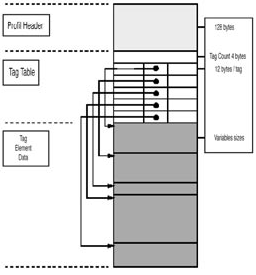
An ICC profile contains descriptive metadata, profile tags, and transformation information. Together, those elements define the device class, the source or destination color space, the profile connection space, and the data needed for actual conversions.
In a complete workflow, different profile types are used for input devices, displays, output devices, and specific conversions. A profile header typically records items such as profile version, device class, color space, rendering intent, creation date, and preferred color management module.
Profile Connection Space
The Profile Connection Space, or PCS, is the neutral reference used to translate color from one device space to another. In most ICC workflows the PCS is based on either CIELAB or XYZ.
Using ICC profiles
What is a CMM?
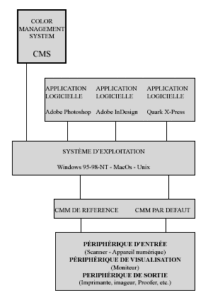
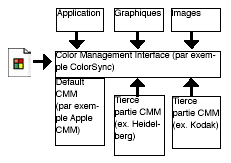
A Color Management Module, or CMM, performs the actual translation from one color space to another. Applications and operating systems may offer different CMM implementations, but the basic objective remains the same: map source colors into the destination space as consistently as possible.
Perfect equivalence between devices does not exist. Scanner gamuts, display gamuts, and print gamuts all differ. This is why profile-based conversion always involves choices about how to treat colors that do not fit into the destination space.
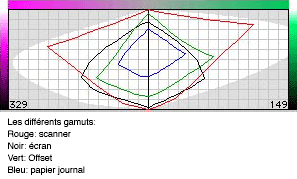
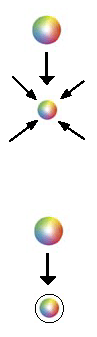
In practice, mapping usually means converting scanner or camera RGB through the PCS, then into display RGB or output CMYK. When the destination gamut is smaller, out-of-gamut colors must either be clipped or compressed according to the chosen rendering intent.
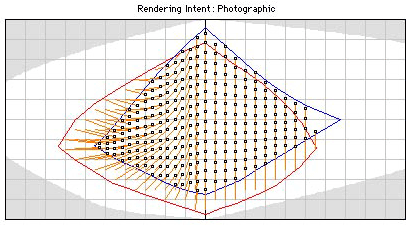
Perceptual intent
Perceptual rendering aims to preserve the overall visual relationships between colors. It compresses the source gamut so that both in-gamut and out-of-gamut colors maintain a coherent appearance in the destination space. It is often preferred for photographic imagery.
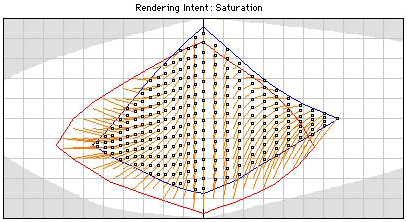
Saturation intent
Saturation rendering emphasizes vividness rather than accuracy. It is typically more useful for business graphics, charts, and presentation material than for photographic reproduction.
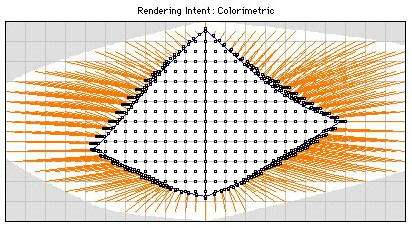

Relative colorimetric intent
Relative colorimetric rendering preserves in-gamut colors more strictly and clips colors that fall outside the destination gamut. It is often a strong choice for logos, vector graphics, and work where color accuracy matters more than smooth global compression.
Absolute colorimetric intent
Absolute colorimetric rendering also accounts for the destination white point. It is typically used when simulating a specific print condition, including paper color, rather than adapting the result to a new white reference.
Color management at the operating-system level
ColorSync on macOS
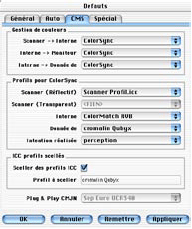
On the Macintosh platform, ColorSync became a foundational layer for system-level color management. It handles profile selection, monitor calibration support, and application-level profile exchange through a common architecture aligned with ICC standards.
Because ColorSync supports multiple applications and can work with different CMMs, it helped make profile-based workflows practical in production environments.
ICM on Windows
Windows introduced its own system-level approach through Image Color Matching, or ICM. Like ColorSync, it acts as an interface between applications, profiles, and color transforms, although historically it was less dominant in high-end graphic-arts workflows.
Embedded profiles
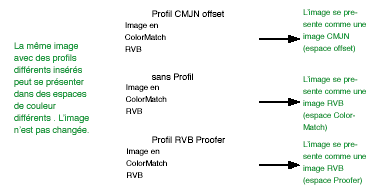
An embedded profile is stored directly inside the file it describes. This makes it possible to preserve the original color context of an image as it moves between applications, systems, and devices. Formats such as TIFF, EPS, GIF, and others can carry this information when supported by the software in use.