
A guide to analogue proofing, digital proofing, soft proofing, RIP behavior, and profile control before final print approval.
Why Proofing Matters
Proofing is the validation stage that sits between file preparation and final printing. Its purpose is simple: to predict the printed result closely enough that technical and visual decisions can be approved before press time is spent. Done properly, proofing saves both money and production time because it reduces uncertainty at the most expensive end of the workflow.
A proof should preserve layout integrity, reproduce the intended color relationships, and reflect the behavior of the target press condition as accurately as practical. The proof does not have to be identical to press in every physical detail, but it must be close enough to support confident decision-making.
Analogue Proofing
Classic analogue systems such as Cromalin and Matchprint were built around screened films and photosensitive materials. These processes simulated the press result with remarkable credibility and became the contractual reference for many printers and clients. Although they were expensive, they offered a high level of confidence because they were designed specifically to imitate offset reproduction.
Analogue proofing also required strict control. Temperature, exposure lamps, pigment sequence, and control bars all influenced consistency. Even so, analogue systems often delivered the most trusted approvals of their time, especially in premium print environments where contractual certainty mattered more than speed.
Cromalin became synonymous with high-end colour proofing. In principle, a support sheet was laminated, exposed, stripped, and then built up with the individual CMYK separations before receiving a protective top layer. Competing systems from Imation and Agfa followed different technical paths, but they pursued the same goal: to create a stable, predictable prepress proof that the client and printer could both trust.
The Eurostandard emerged as a reference for controlled four-colour printing in Europe. Through organizations such as FEDEC and related professional groups, it helped define process expectations, tolerances, and proofing quality levels. In practice, it gave printers, agencies, and prepress operators a common reference point for evaluating whether a proof was behaving as expected.
Digital Proofing
Digital proofing grew quickly because it reduced cost and production time while fitting naturally into computer-based workflows. Instead of relying on film-based analogue materials, it used printers, RIPs, and color-managed conversions to simulate the final print condition. That shift made proofing faster, more flexible, and easier to integrate with modern production.
Digital proofing, however, introduced its own limits. Some systems ignored screening entirely and produced continuous-tone output. Others simulated the screen itself and therefore came much closer to the actual press result. The value of a digital proof depends on knowing which kind of proof it is and whether it is being used for internal review, client approval, or contractual sign-off.
Continuous-Tone Digital Proofs
Continuous-tone proofing systems focus on colour appearance rather than screen structure. Inkjet, thermal sublimation, and similar devices can produce convincing colour simulations quickly and at relatively low cost, but they do not necessarily replicate the halftone behavior of the press. For many workflows this is acceptable, especially when the goal is to approve image balance, not to analyse screen geometry.
These systems became popular because they are economical and easy to operate. When supported by a stable RIP, proper profiling, and control-strip verification, they can deliver highly useful approvals for day-to-day production.
Halftone Digital Proofs
Halftone proofing pushes digital proofing further by reproducing the screen structure used for final imaging. This approach is more demanding and more expensive, but it provides a much stronger simulation of the actual press behavior. To work well, it should rely on the same RIP logic used for plates or imagesetters, so that the proof and the final output share the same screening intent.
Because of this, halftone systems are generally positioned higher in the market and are used when proof fidelity matters more than cost or speed.
What Makes a Digital Proof Reliable
A good digital proofing system must support profiling, process control, and repeatability. It should be able to simulate different print conditions, from coated stock to newsprint, while also offering its own internal calibration or linearization stage. Control strips remain essential here, just as they do in analogue proofing, because they provide measurable confirmation that the proof is still within tolerance.
Standards bodies such as FOGRA and professional printing associations have long proposed guidance for tone values, paper classes, and control methods. In real production, many printers blend those formal references with their own experience and house standards, but the principle remains the same: the proof must be measurable, not just visually plausible.
Soft Proofing on Screen
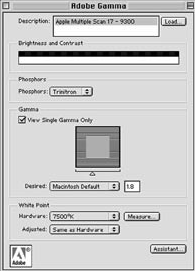
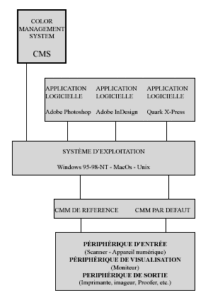
Soft proofing replaces the physical proof with a calibrated monitor and a set of trusted profiles. Instead of printing a simulation, the operator previews the expected output condition directly on screen through a color management system. This makes soft proofing fast, inexpensive, and especially attractive when many variants must be reviewed quickly.
Its success depends entirely on the quality of the display environment. If the monitor is poorly calibrated, the ambient light is uncontrolled, or the output profile is weak, the soft proof becomes little more than a guess. But when the viewing conditions are disciplined, screen proofing can be a powerful operational tool.
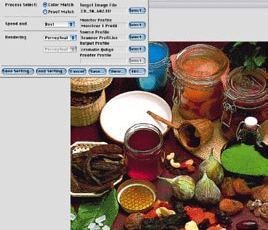
Applications such as Photoshop, and dedicated tools such as dedicated proofing tools, made it possible to preview printer or proofing profiles directly on screen. In that sense, soft proofing became one of the clearest examples of color management working as intended: a controlled monitor standing in for an output process that is not physically present in front of the user.
On the American market, SWOP became a major reference for web-offset publication printing. Like Eurostandard in Europe, it provided a framework for process control, tolerances, and quality expectations. As prepress moved from film toward digital files, SWOP evolved as well, adapting its recommendations to the realities of modern workflows.
Editing ICC Profiles
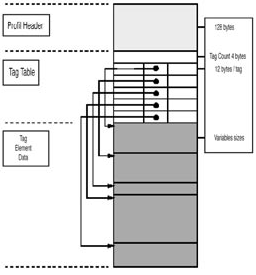
Creating a profile is not always the end of the process. In some cases, a profile needs adjustment because the measurement was imperfect, because the target result has shifted, or because a client or production team wants to steer the rendering in a specific direction. Profile editors emerged to make those corrections possible.
Editing tools allow operators to inspect gamut shape, white point, black point, contrast behavior, neutrality, and selective color balance. In effect, they provide a controlled way to refine how one device simulates another. This is particularly useful when a technically valid profile still fails to deliver the preferred visual result.
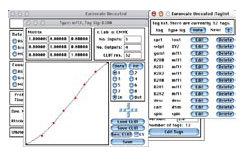
The reason to edit a profile is not only technical correction. Sometimes it is creative intent. A client may prefer brighter colour, a softer contrast, or a more neutral rendering. In other cases, the profile simply needs repair because it does not describe the device accurately enough. Either way, profile editing sits between strict measurement and practical output expectations.
The Role of the RIP
The Raster Image Processor, or RIP, is the final control point before output. Its job is to translate page-description data into the bitmap information that an imagesetter, platesetter, or digital proofing device can actually print. Because of that position in the workflow, the RIP is also an important place for color conversion and proof simulation.
Many RIPs apply printer and press profiles, generate their own screening logic, and manage queues, device settings, and job preparation on behalf of the whole production environment. In modern workflows the RIP often behaves less like a simple translator and more like a server-side production engine.
PostScript became the reference language for print description because it provided a device-independent way to describe text, graphics, and images. EPS extended that logic to placed graphic files, and RIPs were built to transform that vector and page-description data into output-ready raster information.
A Color Rendering Dictionary belongs to the PostScript ecosystem and describes how colors should be converted between spaces during output. In practical terms, CRDs gave PostScript-based workflows a structured way to control rendering behavior before ICC profiling became the dominant model for many production environments.
Whether the workflow uses analogue proofs, digital proofs, soft proofs, or a hybrid of all three, the central idea never changes: proofing is only valuable when it is predictable, measurable, and tied to the actual output condition. Without that connection, a proof may be attractive, but it is no longer a dependable production tool.